



What Is the Difference Between Product ID, Item Group ID and SKU in Google Merchant Center?
Product ID [id] identifies an individual product or variant in Google Merchant Center. Item group ID [item_group_id] connects variants of the same product, such as different colours or sizes. SKU (stock keeping unit) is a retailer’s own inventory code, which can also be used as the Google product ID. The three terms are related, but they are not interchangeable.
What does each identifier do?
|
Identifier |
Purpose |
Google Merchant Center requirement |
|
Product ID [id] |
Unique identifier for each submitted product or variant |
Required for every product |
|
Item group ID [item_group_id] |
Shared identifier linking variants of one product |
Required for variant free listings and for variant Shopping ads in specified countries |
|
SKU |
Merchant’s internal stock or inventory identifier |
Not a separate required GMC feed attribute; can be used as [id] |
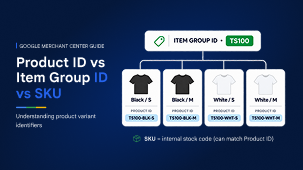
Example: one T-shirt in different sizes and colours
Imagine a retailer selling the same cotton T-shirt in black and white, each in small and medium. When submitting Google Merchant Center product variants, each purchasable variant needs its own product ID. All four variants share the same item group ID.
|
Variant |
Product ID [id] |
Item group ID |
Internal SKU |
|
Black / Small |
TS100-BLK-S |
TS100 |
TS100-BLK-S |
|
Black / Medium |
TS100-BLK-M |
TS100 |
TS100-BLK-M |
|
White / Small |
TS100-WHT-S |
TS100 |
TS100-WHT-S |
|
White / Medium |
TS100-WHT-M |
TS100 |
TS100-WHT-M |
Illustrative product-feed example. The same item group ID links four variants; each product ID remains unique.

Illustrative product variants: separate Product IDs and SKUs for blue and purple T-shirts
Can the SKU and Product ID be the same?
Yes. When comparing SKU vs product ID, it is important to understand that they can share the same value. Google recommends using the product SKU as the value for [id] where possible. For example, a retailer may use TS100-BLK-S in both its inventory system and Google Merchant Center. However, a SKU is not an additional standard attribute that must be submitted separately alongside [id].
When is Item Group ID required?
For free listings, the Google Merchant Center item group ID [item_group_id] is required for product variants. For Shopping ads, Google specifically requires it for variants targeting Brazil, France, Germany, Japan, the United Kingdom and the United States. Other target countries have different item group ID requirements, so check the current specification before assuming it is mandatory everywhere. Do not use an item group ID for a standalone product with no variants.
Why is it important to keep product IDs consistent?
Google uses [id], together with the target country and language, to identify products and track their history. Changing an ID unnecessarily can interrupt continuity in product-level reporting. Avoid recycling old IDs for unrelated products, and never give different sizes or colours of a product the same [id].
Common feed mistakes
When managing Google Merchant Center feed attributes, avoid these common mistakes:
-
Using one product ID for every size or colour, rather than a separate ID for each variant.
-
Assigning different item group IDs to variants that belong together.
-
Using one item group ID to combine unrelated products or different styles.
-
Changing IDs during a platform or feed migration even though the underlying products have not changed.
-
Grouping variants without consistently providing their distinguishing attributes, such as size and colour.

Actual Merchant Center product listing showing Product ID, MPN, GTIN and Item group ID.

Illustrative product record showing how SKU, Product ID, GTIN and MPN differ.
What should you check in the Merchant Center?
Open the product details for a sample of variants and compare their IDs, item group IDs and variant attributes. Check that each variant has a unique [id], related variants share the same [item_group_id], and the landing page offers the corresponding size or colour. When troubleshooting, use the product ID to locate the affected item in your data source and Merchant Center.
At ShoppingIQ, product feed optimization includes checking identifier consistency when reviewing feed structures and migrations, particularly where variants or product history may be affected.
Official Google references
FAQs
1. What is the difference between Product ID and Item Group ID in Google Merchant Center?
A Product ID [id] uniquely identifies an individual product or variant in Google Merchant Center. An Item Group ID [item_group_id] connects different variants of the same product, such as sizes or colours. Each variant requires its own Product ID, while related variants share the same Item Group ID.
2. Can I use my SKU as a Product ID in Google Merchant Center?
Yes. Google Merchant Center allows retailers to use their internal SKU (Stock Keeping Unit) as the Product ID [id]. This helps maintain consistency between inventory systems and product feeds. However, each submitted product or variant must have a unique Product ID.
3. Is Item Group ID required in Google Merchant Center?
Item Group ID [item_group_id] is required for product variants in free listings. For Shopping ads, it is mandatory for variants targeting certain countries, including the United Kingdom, United States, Germany, France, Brazil and Japan. Standalone products without variants do not need an Item Group ID.
4. Can multiple product variants have the same Item Group ID?
Yes. Different variants of the same product should share the same Item Group ID. For example, a T-shirt available in multiple sizes and colours can have one shared Item Group ID, but each size and colour combination must have its own unique Product ID.
5. What happens if I change a Product ID in Google Merchant Center?
Changing a Product ID can cause Google Merchant Center to treat the item as a new product, potentially disrupting its product history and reporting continuity. Retailers should keep Product IDs consistent and avoid unnecessary changes, particularly during feed migrations or platform updates.









No comments yet.