



What Is the Google Merchant Center Product Type Attribute, and How Does It Work?
The product type [product_type] attribute lets you submit your own product categories to Google Merchant Center. Unlike Google's predefined product categories, these are based on how you organise your catalogue. The Google Merchant Center product type attribute is optional, but a consistent product type structure can make Shopping campaign reporting and product-group organisation more useful
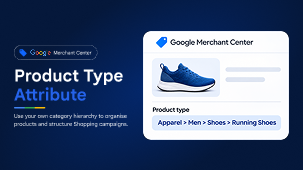
How does product type work?
Think of product type as the breadcrumb trail a shopper might follow on your website. Instead of entering only “Running Shoes”, you can provide the full path: “Apparel > Men > Shoes > Running Shoes”. This tells you exactly where the product sits within your catalogue and helps maintain a clear product type hierarchy.


Actual Google Merchant Center product details: Product type shown as ”Clutch Bag”.
How is product type different from Google product category?
Product type [product_type] uses categories you create, such as “Home > Living Room > Sofas > Corner Sofas”. Google product category [google_product_category] uses Google’s standard taxonomy.
When comparing product type vs Google product category, the key difference is that one reflects your own merchandising structure, while the other helps Google classify products consistently. We will cover Google product category in the next blog.
Why does it matter for Shopping campaigns?
In Standard Shopping campaigns, product type can be used to subdivide product groups and review performance by categories that make sense to your business. For example, a retailer might separate Running Shoes from Walking Shoes when analysing sales or setting bids. A consistent Google Shopping product type structure can support clearer campaign organisation, but product type alone does not guarantee better performance, and campaign controls differ across campaign types.
For retailers managing large product catalogues, effective Google Shopping feed management can help maintain consistent product type hierarchies and simplify feed updates across Shopping campaigns.
What should you submit?
Use the full hierarchy with a space on either side of the > separator. Keep naming consistent across similar products in your Google Merchant Center product feed. Google allows up to 750 characters and up to five product type values, but only the first is used for Shopping campaign bidding and reporting. If that is your main use case, Google recommends submitting one clear value.

Actual Google Merchant Center product listing: Product type values across different products.
Common mistakes to avoid
-
Using inconsistent names for the same category, such as “Trainers”, “Sneakers” and “Running Footwear” without a deliberate structure.
-
Submitting only the final category name when a meaningful full hierarchy is available.
-
Confusing your own product type with Google’s predefined product category.
-
Changing category paths without checking whether Shopping product-group subdivisions rely on the existing values.
How can you check your product types?
Review the product type attribute values in your source feed or Google Merchant Center product details. Look for blank, inconsistent or overly broad paths, then compare them with the categories used in your Shopping campaigns. If you update a hierarchy, check the affected product groups and reporting after the feed refresh.
A quick check before submitting
-
Does each product have a logical category path?
-
Are similar products classified consistently?
-
Is the first product type the one you want to use for Shopping campaign organisation?
At ShoppingIQ, we review product type structures alongside campaign organisation to keep feed categories practical and consistent.
Official Google reference: Product type [product_type]
FAQs
1. What is the Product Type attribute in Google Merchant Center?
The Product Type [product_type] attribute allows retailers to define their own product categories in Google Merchant Center. It helps organise products using a custom category hierarchy and supports product-group organisation, bidding and reporting in Google Shopping campaigns.
2. Is the Product Type attribute required in Google Merchant Center?
No, the Product Type attribute is optional in Google Merchant Center. However, adding a clear and consistent product type hierarchy is recommended because it helps organise products and can make Standard Shopping campaign reporting and bidding more manageable.
3. What is the difference between Product Type and Google Product Category?
Product Type uses your own store’s category hierarchy, while Google Product Category follows Google’s predefined taxonomy. Product Type supports merchant-defined organisation, whereas Google Product Category provides standardised product classification across Merchant Center.
4. How do I add Product Type in Google Merchant Center?
To add Product Type, include the [product_type] attribute in your Merchant Center product data source. Enter your complete category hierarchy, such as “Apparel > Men > Shoes > Running Shoes”, using spaces around each > separator. Google recommends including all relevant category levels.
5. How many Product Type values can I submit in Google Merchant Center?
Google Merchant Center allows up to five Product Type values per product, with a maximum of 750 characters per value. However, only the first value is used for bidding and reporting in Google Ads Shopping campaigns. Google recommends submitting one clear value when campaign organisation is the primary purpose.









No comments yet.